A note is useful only if we can return to it when we need it.
That sounds simple. Yet finding an old note can be surprisingly difficult, even when we know we saved it somewhere.
A meeting summary might be buried in a project folder. An interesting quotation may have been saved under a vague title. A useful idea could be sitting in a notebook we have not opened for months.
The difficulty is not always a lack of organization. Sometimes, the system that made sense when we saved something no longer matches the way we search for it.
This raises an important question: Should we organize notes by where they belong, what they are about, or how we expect to use them?
The answer depends on what we want our notes to do. Understanding the different ways of organizing information can help us build a system that remains useful as our collection grows.
Why Organizing Notes Is Really a Retrieval Problem
People have organized recorded information for thousands of years.
Ancient archives grouped administrative records so they could be managed and consulted. Libraries developed catalogs and classification systems to help readers locate books. Later, computers introduced directories and folders as familiar ways to organize digital files.
These systems differ in their technologies, but they address a similar challenge: how can someone find a particular record among many others?
A note collection presents the same problem on a smaller scale.
Imagine saving an observation about how people search for information.
You might place it in a folder called “Research.” That seems reasonable when you save it.
Six months later, you are writing about the history of libraries. You remember the observation, but you search under “Libraries” rather than “Research.”
The note has not disappeared. The difficulty is that the category used when storing it is different from the category used when looking for it.
This is one reason organizing notes cannot be reduced to putting everything into the correct folder.
There may be several reasonable places for the same idea.
A note about library catalogs could relate to history, information retrieval, classification, or digital search. Which category is correct?
Potentially all of them.
The goal of organization is therefore not to give every note one perfect location. It is to create enough useful paths back to the information. That distinction becomes especially important as notes accumulate.
Folders, Tags, and Search Solve Different Problems
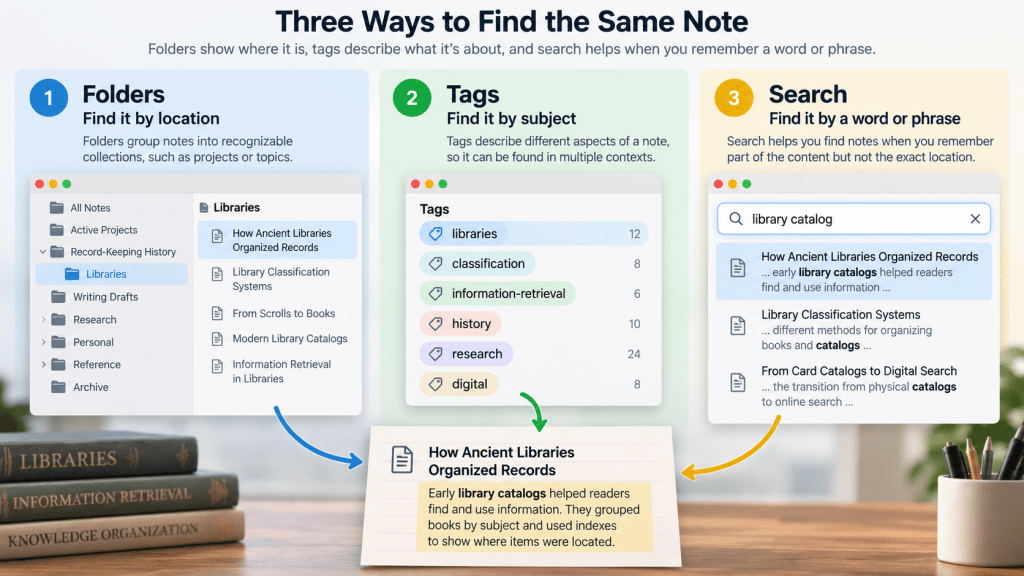
Folders, tags, and search are often presented as competing approaches to organization. In practice, they serve different purposes.
Folders Provide a Stable Place
Folders group notes into recognizable collections.
For example, a writer might use folders such as:
- Active Projects
- Research
- Personal Records
- Reference Materials
This structure is useful because it creates clear boundaries.
If you are working on a particular article, keeping its outline, interview notes, and research materials together can reduce confusion.
Folders also make it easier to manage collections as units. You can archive an entire project when it is finished or separate private records from general reference material.
But folders have a limitation.
A note may belong to several subjects at once, while a traditional folder hierarchy usually gives a file one primary location. You can create copies or shortcuts, but that introduces additional management decisions.
Folders work best when the question is:
“Which collection or project does this note belong to?”
Tags Describe What a Note Is About
Tags provide another way to describe information.
Instead of placing a note in only one subject category, you can associate it with several relevant concepts. A note about early library catalogs might have tags such as:
libraries · classification · information-retrieval
These labels describe different aspects of the same record.
Tags can be useful when a collection contains ideas that overlap across projects.
However, adding more tags does not automatically improve organization. A collection with hundreds of inconsistent labels may become difficult to navigate.
For example, using research, research-notes, researching, and study without a clear distinction may create unnecessary complexity.
A smaller, consistent vocabulary is often easier to maintain.
Tags work best when the question is:
“What subjects or characteristics does this note relate to?”
Not every application treats tags in the same way. Some use them primarily as labels, while others provide hierarchical or more advanced organizational features.
The underlying principle is simply to make information discoverable through more than one description.
Search Helps When We Do Not Remember the Location
Search offers a different approach. Instead of navigating through categories, we enter words or phrases that may appear in a note.
This is especially helpful when we remember part of the content but not where it was stored.
Suppose you remember reading something about “associative trails” in early discussions of information technology.
Searching for that phrase may lead directly to a note about Vannevar Bush’s proposed Memex. You do not necessarily need to remember which folder contains it.
But search also has limitations.
If the note uses different terminology from the words you remember, a simple keyword search may fail.
Searching for “linked information” might not retrieve a note that discusses only “associative trails,” depending on the tool’s search capabilities.
Searchable text and descriptive titles help, but they cannot eliminate every mismatch between how information is written and how we remember it.
Search works best when the question is:
“What words, names, or ideas do I remember from this note?”
How to Build a Note System That Remains Easy to Use
The most useful organizational system is not necessarily the most detailed. A complex structure can become another task that demands constant maintenance. For most people, a practical starting point is to combine a few simple principles.
Use Broad Categories Before Creating Subfolders
Start with categories that reflect meaningful differences in how you use information.
For example:
Projects — Notes related to work with a defined outcome.
Reference — Information you may need to consult again.
Personal — Records that serve personal purposes.
Archive — Material from completed projects or inactive areas.
These are examples, not universal categories.
Someone managing academic research may need a different structure from someone maintaining household records.
The important point is to avoid creating a new folder every time a slightly different subject appears.
If a folder contains only one note and has no clear purpose, it may not need to exist yet.
Additional categories can be introduced when repeated use reveals a genuine need.
Give Notes Titles That Will Make Sense Later
A descriptive title is often more valuable than an elaborate folder structure.
Compare these titles:
Meeting Notes
Website Redesign — Accessibility Review and Launch Timeline
The second title gives the reader more clues about what the note contains. It is easier to recognize in a list and provides useful words for searching.
A good title does not need to include every detail. It should identify the subject clearly enough that your future self can distinguish it from similar notes.
For notes that depend on a particular event, a date or project name may also help. For example:
2026-10-08 — Website Redesign Meeting
Dates are especially useful for chronological records, but they are not necessary for every idea or reference note.
The purpose is clarity, not rigid formatting.
Add Tags Only When They Create Another Useful Path
Tags are most helpful when they solve a problem that folders and titles do not.
Suppose you keep research notes in project folders. Several projects may involve information retrieval, even though their main subjects differ.
A consistent information-retrieval tag could help you find those notes across projects.
But if you rarely search by topic, an extensive tagging system may provide little benefit.
Before adding a tag, ask whether you are likely to use it to find or group notes later. If the answer is unclear, the tag may not be necessary.
Preserve Enough Context to Understand the Note
Organization helps us locate information, but finding a note is not the same as understanding it.
Consider a note titled:
Interesting Research Finding
Even if you find it immediately, the title reveals little. Inside, you might discover a quotation with no source or explanation. A more useful note could include:
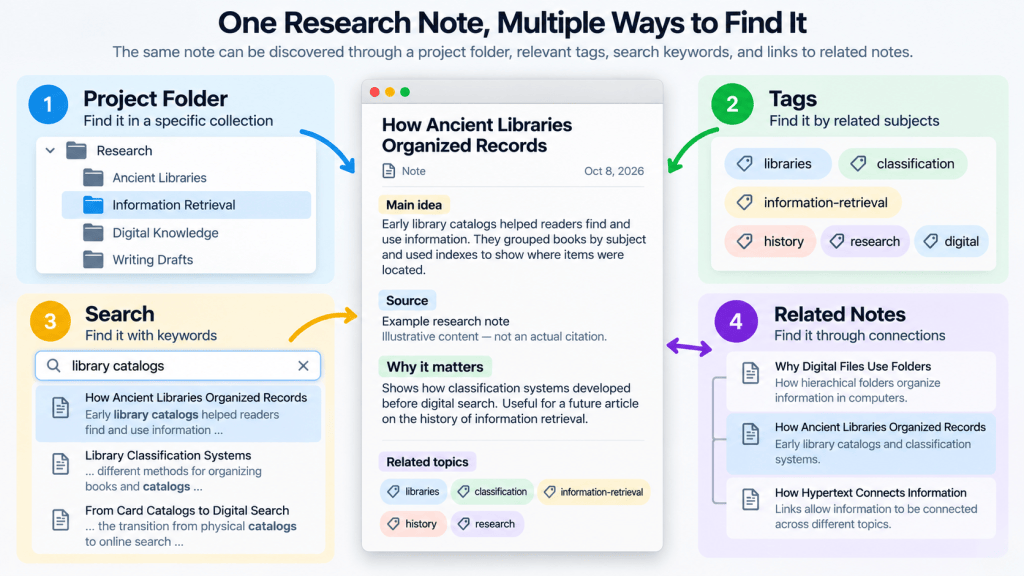
Title: Retrieval Practice and Long-Term Memory
Source: Research article on retrieval practice
Main idea: Actively recalling information can support long-term retention.
Why it matters: May help improve how I review research material.
This example is intentionally simple.
The source field should contain an actual citation or link when the note records information from a real publication. The additional context helps the note remain understandable after the original reading session.
When Should We Connect Notes Instead of Adding More Categories?
As a collection grows, some notes become difficult to organize because they belong to several areas at once.
This is not necessarily a sign that the folder structure has failed. It may indicate that the notes describe relationships between ideas rather than separate subjects.
For example, consider three notes:
How Ancient Libraries Organized Records
Why Digital Files Use Folders
How Hypertext Connects Information
Each note belongs to a different historical or technical context.
Yet all three address a broader question:
How do people make recorded information easier to find and use?
Instead of creating another folder that duplicates these subjects, you could add references between the notes.
A note about digital folders might include:
Related idea: Library catalogs also helped people locate information within growing collections, although the technologies and methods were different.
A note about hypertext might include:
Related idea: Unlike a folder hierarchy, hypertext allows information to be connected through explicit links.
These connections preserve relationships that a simple category label may not explain.
They can also help when developing an article, comparing technologies, or revisiting a question from a new perspective.
This does not mean every note should link to many others. Unnecessary links can create clutter just as unnecessary tags can.
A connection is most valuable when it explains why two pieces of information belong together.
A Practical Way to Start
If your notes are currently scattered across several folders or applications, begin with one active project.
Find the notes you expect to use. Then check whether each note has a recognizable title, enough context to understand it, and a reasonable way to retrieve it.
You may discover that better titles solve most of your problems. Or you may find that a few consistent tags help you retrieve ideas across projects.
If you regularly compare related concepts, adding links between notes may become useful. There is no need to build all of these features at once.
A note system should become more organized in response to real use, not more complicated in anticipation of every possible future need.
Folders provide structure. Tags provide additional descriptions. Search helps locate information through remembered terms. Links preserve meaningful relationships. Together, they can support a collection that remains useful without requiring constant reorganization.
The purpose of organizing notes is not to create a flawless archive. It is to make recorded information easier to find, understand, and use when it matters.
FAQ
Are Folders or Tags Better for Organizing Notes?
Neither is universally better. Folders are useful for grouping notes by project or collection, while tags help describe subjects that may overlap across different folders. Many people benefit from using a simple folder structure with a small number of consistent tags.
How Many Folders Should a Note-Taking System Have?
There is no ideal number. Start with a few broad categories that reflect how you use your notes. Add subfolders only when they make retrieval or project management easier. A smaller structure that you understand is often more useful than a detailed hierarchy you rarely navigate.
Should I Organize My Notes Before Relying on Search?
You do not need to organize every note before using search. Clear titles and searchable content may already make many notes easy to retrieve. However, basic organization and context remain helpful when you cannot remember the exact words used in a note or need to browse related material.
Sources and Further Reading
Library of Congress — Library of Congress Classification
Encyclopaedia Britannica — Information Retrieval
Microsoft Learn — File Systems
CERN — The Birth of the Web

