Open almost any computer today, and you will encounter a familiar arrangement: files stored inside folders.
Documents, photographs, spreadsheets, and downloaded materials are represented as separate objects. Folders group them together, often inside other folders. A person can move through this structure much as they might open a filing cabinet, select a drawer, and find a document.
Yet digital information does not naturally come in the form of paper sheets or cardboard folders. A computer stores data electronically. It does not need a miniature filing cabinet inside its storage device.
So why did files and folders become such familiar parts of computing?
The answer involves two developments that are often treated as one: the technical systems computers use to organize stored data, and the visual interfaces people use to understand and manage that data.
Together, they transformed an invisible storage system into something people could navigate.
From Paper Records to Digital Files
Long before personal computers became common, offices, libraries, and archives had developed ways to manage growing collections of documents.
Paper records were often grouped by subject, department, date, or purpose. Folders kept related documents together, while cabinets and shelves provided physical locations.
These systems had limitations, but they offered a practical advantage: people could understand where information belonged.
A document might be stored in a particular folder because it concerned a particular customer or project. Finding it later involved remembering the organizational structure and following it to the right location.
Computers introduced a different kind of storage.
Instead of preserving information on separate sheets of paper, digital systems could store encoded data on media such as magnetic tape, magnetic disks, and other electronic storage devices.
But digital storage still required organization. A computer needed ways to distinguish one collection of data from another, determine where stored information could be found, and manage operations such as reading, writing, and updating it. This is where the concept of a digital file became important.
A file provides a logical unit for storing and managing data. Depending on the system, it might contain text, a program, an image, or another form of information.
The file is not necessarily stored as one uninterrupted physical block. Its logical identity is separate from the details of how the storage system places its data on a device. This distinction became essential as computer storage grew more complex.
The familiar document icon would come later. First, computers needed reliable methods for identifying and managing stored information.
File Systems Organized Data Before Folder Icons
Early computers did not present users with the colorful desktop environments familiar today. Many systems were operated through specialized controls, punched cards, or text-based commands.
Nevertheless, they still needed methods for organizing data. File systems developed to manage stored files and the information required to access them.
Different operating systems adopted different approaches. Some early systems used relatively simple file naming arrangements, while others developed more elaborate directory structures.
One influential development occurred in the 1960s with the Compatible Time-Sharing System, or CTSS, at MIT. CTSS helped establish important practices for interactive computing, including managing files associated with individual users.
Another significant step came with Multics, a time-sharing operating system developed through a collaboration involving MIT, Bell Labs, and General Electric.
Multics introduced a hierarchical file organization in which directories could contain entries for files and other directories. This structure allowed information to be organized at multiple levels. Rather than placing every file into one enormous collection, users could navigate a hierarchy.
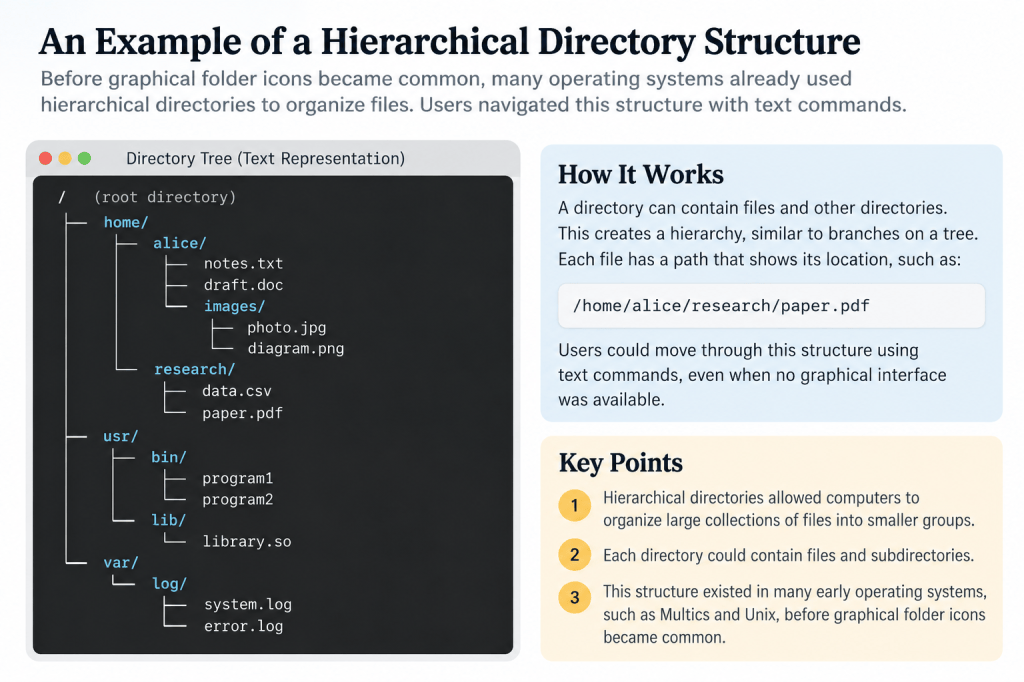
For example, a directory for a research project might contain separate directories for reports, observations, and correspondence. Each directory could contain additional files or subdirectories. This approach helped solve a practical problem: as the number of files increased, a single flat list became difficult to manage.
Hierarchical directories offered a way to divide a large collection into smaller, more meaningful groups.
The Unix operating system, developed beginning in 1969 at Bell Labs, also adopted a hierarchical file system. Unix made the directory tree a central part of its approach to organizing files and navigating the operating system. Importantly, none of this required a graphical folder icon. A user could move through directories by entering commands and specifying paths.
The hierarchy existed as part of the system’s organization, even when it was represented entirely through text.
The directory came before the familiar picture of a folder.
The Desktop Metaphor Made Digital Storage Familiar
As computing moved beyond specialists, designers faced another challenge.
How could people interact with digital information without memorizing complicated commands?
One influential response was to represent computer operations through familiar visual objects.
Researchers at Xerox’s Palo Alto Research Center, commonly known as Xerox PARC, played an important role in developing graphical computing environments during the 1970s.
The Xerox Alto, introduced in 1973, helped demonstrate the possibilities of personal interactive computing with a graphical display, pointing device, and windows.
Later Xerox systems, including the Xerox Star, developed a more explicitly office-oriented interface. The Xerox Star, introduced in 1981, used representations of familiar office objects such as documents, folders, and filing cabinets.
These visual elements were part of what became known as the desktop metaphor.
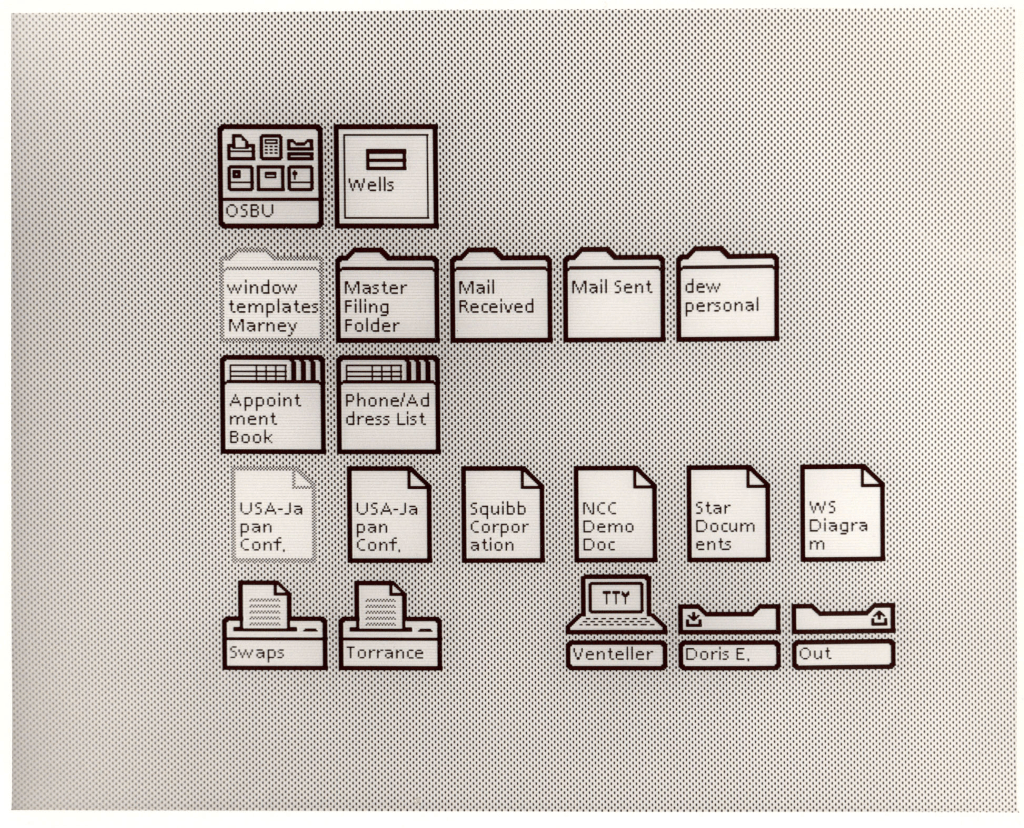
Instead of requiring users to think only in terms of abstract storage addresses and commands, the interface presented objects that resembled things they already knew. A document could appear as an icon. A folder could contain documents. A user could select an object and perform an action on it.
The resemblance to physical office work helped make an unfamiliar computing environment easier to understand.
The desktop metaphor did not mean that digital files literally behaved like paper documents. It provided a visual model for interacting with the underlying system. That distinction is important.
A folder icon is an interface representation. The actual storage and directory structures are managed by software beneath the interface.
The metaphor also had limits. Digital objects could be copied, searched, or transmitted in ways that physical paper could not. Still, the visual language proved influential.
Graphical interfaces developed further through systems such as Apple’s Lisa and Macintosh, as well as Microsoft Windows and other computing environments.
Over time, the folder became one of the most recognizable symbols of digital organization.
Why Folders Became Useful—and Limiting
Folders offered a practical solution to a problem that existed long before computers.
They gave collections a structure.
A person could group documents by project, client, topic, or year. A hierarchy could divide broad categories into more specific ones. This made files easier to browse when the organizational structure was familiar.
Consider a folder called “Research.”
Inside it might be separate folders for historical sources, article drafts, images, and references. A writer returning to the project could follow those categories to locate the relevant material.
But folders also inherited a limitation of physical filing systems. A conventional folder hierarchy generally gives a file one primary location within that hierarchy.
What happens when a document belongs to several topics?
A research note about ancient libraries might also be relevant to the history of classification, information retrieval, and modern knowledge management.
Placing it in one folder does not automatically make it easy to discover through the others.
Users can create copies, shortcuts, symbolic links, or other references, depending on the operating system. But each approach introduces additional choices.
The problem becomes more noticeable as collections grow.
A folder structure that works well for fifty files may become difficult to navigate when it contains thousands.
People may forget where they saved something or disagree about which category is most appropriate.
These are not necessarily failures of the folder concept.
They reveal a broader challenge: information can have multiple relationships, while a simple hierarchy emphasizes one organizational path at a time.
This is one reason digital information management gradually expanded beyond folders alone.
From Folders to Search, Metadata, and Connected Information
Modern computers still use file systems and directories, but people no longer depend exclusively on browsing folder structures to find information.
Search provides another route.
Instead of remembering where a document was stored, a user may search for its name, contents, or other identifying information.
Metadata provides additional context.
A file may have information associated with it, such as its creation date, modification date, type, author, or descriptive tags.
These details can help people distinguish and retrieve files without relying entirely on their locations.
Digital knowledge-management tools extend the idea further.
A note can contain links to related notes. Information can be grouped through properties, tags, databases, or other structures.
Different tools implement these features in different ways, and they are not interchangeable. A tag does not work exactly like a folder. A link between two notes is not the same as assigning them to the same category.
But they all respond to a problem that becomes more important as information accumulates. People need more than one way to return to what they have recorded. This brings us back to the history of libraries and personal notebooks.
Libraries developed catalogs so readers could find books without examining every shelf. Commonplace books used headings to make collected passages easier to revisit.
Digital file systems provided structured ways to store and identify electronic information. Graphical interfaces made those structures easier for people to understand.
Today, search and connected information systems offer additional ways to navigate growing collections. The tools have changed, but the underlying question remains remarkably consistent:
How can we organize information today so that we can find and use it when it matters?
Folders remain useful because they provide structure and a sense of location. But the evolution of digital records shows why location alone is not always enough.
As information systems became more connected, the next challenge was no longer simply where a record belonged.
It was how one record could lead to another.
That development would help shape hypertext, the web, and modern linked knowledge systems.
FAQ
Who invented computer folders?
There is no single inventor of the entire modern folder concept. Hierarchical directories developed in operating systems before graphical folders became common. Systems such as Multics and Unix contributed to the development of hierarchical file organization, while Xerox PARC and later personal computer interfaces helped popularize visual representations of documents and folders.
What is the difference between a file system and a folder?
A file system is the software-managed structure used to organize and access stored data. A directory is an organizational component within many file systems. A folder is the familiar user-interface representation of a directory or another container for information. In everyday computing, the terms folder and directory are often used interchangeably, although their meanings are not identical in every system.
Are folders becoming obsolete?
No. Folders remain useful for organizing files and providing predictable locations. However, modern systems increasingly combine folders with search, metadata, tags, and links. These additional methods help people retrieve information that may be relevant to several different subjects or projects.
Sources and Further Reading
MIT — Multics: History and Innovations
MIT Computer Science and Artificial Intelligence Laboratory — Multics Documents
Computer History Museum — Xerox Alto Source Code
Computer History Museum — The Xerox Star Runs One More Time
Computer History Museum — Xerox Corporation: Selling the Computer Revolution

